The automation continues
The result: Two half-days of work. 101 tests. Zero API tokens shared with third parties. Full control over our automation.
In my previous articles, I’ve shared different pieces of our automation journey at Wishew: ECS deployment notifications, AI-powered code reviews with Gemini, modular AI skills for Claude Code. The underlying goal is always the same: eliminate friction from the software development process.
This time, I want to share the story of ClickLab: a tool I built to replace a third-party service I didn’t trust with our GitLab and ClickUp API tokens.
It was also an excuse to test Anthropic’s new Claude Opus 4.5 model in a real-world project. I have thoughts on that, but I’ll save them for another post.
The problem: trusting third parties with your keys
At Wishew, our development workflow runs on two main tools: ClickUp for project management and GitLab for code. As a small startup team that needs to move fast, we were using a third-party tool called GitUP to bridge them. GitUP handled three things:
- Branch creation: When a task moves to “In Progress”, create a GitLab branch (
feature/orfix/based on task type) - MR status sync: When a merge request opens from a ClickUp-linked branch, update task status to “In Review”
- Completion sync: When the MR merges, update task status to “Done”
Useful automation. But here’s what kept bothering me: I had no idea who developed GitUP.
To do its job, GitUP needed write access to our GitLab repositories and our ClickUp workspace. That’s a lot of trust to place in a service I couldn’t audit. What happens to those tokens? Who has access to their infrastructure? What’s their security posture?
Maybe I’m paranoid. But in a world of supply chain attacks and compromised dependencies, I’d rather control what touches our APIs.
The solution: build it ourselves
We replaced GitUP with two components that we fully control:
- ClickLab (AWS Lambda): Handles branch creation when tasks move to “In Progress”
- GitLab CI template: Handles status updates on MR creation and merge
The Lambda watches ClickUp for status changes; the CI template runs in our existing pipelines. No third-party services. No tokens leaving our infrastructure. And if something breaks, I can read the code and fix it.
Component 1: ClickLab (branch creation)
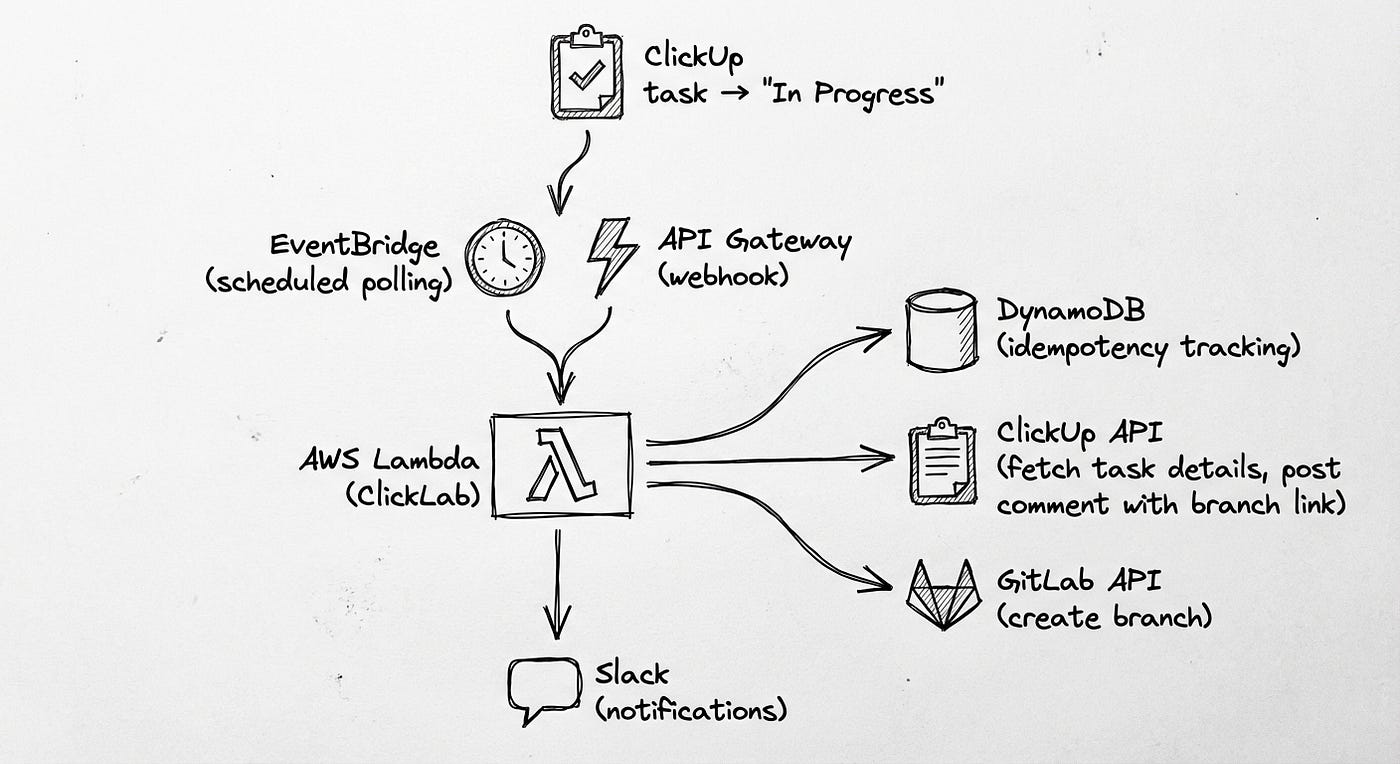
ClickLab is a serverless Lambda that creates GitLab branches when ClickUp tasks move to the configured trigger status.
Key features:
- Dual trigger modes: Webhooks (real-time) + EventBridge polling (fallback)
- DynamoDB: Tracks created branches to prevent duplicates
- Multi-project support: One Lambda handles multiple ClickUp lists → GitLab projects
- Tag-based routing: Task tags determine branch type (
feature/vsfix/) - Task comments: Posts a comment to the ClickUp task with a link to the new branch
Component 2: GitLab CI template (status updates)
The second half lives in our GitLab CI pipelines as a reusable template:
# Included in each project's .gitlab-ci.yml
include:
  - project: 'infrastructure/ci-templates'
    file: '/clickup.yml'
This template handles:
- MR opened: Extract task ID from branch name → Update ClickUp status to “In Review”
- MR merged: Extract task ID from merge commit → Update ClickUp status to “Done”
No Lambda needed: it runs inside the CI jobs we’re already running.
Why SAM over Terraform? For a focused serverless project, SAM wins on simplicity. Native Lambda support, local testing with sam local invoke, and no state file management. Terraform shines for complex infrastructure; for a Lambda + DynamoDB + EventBridge stack, SAM gets you there faster.
But the architecture is just the blueprint. The interesting part is how we built it.
The journey: building with Claude
This is where the story becomes as much about the process as the product. Because ClickLab wasn’t just a project to build automation: it was a case study in applying the modular AI skills approach to a real-world problem.
Act I: the foundation
We started with the core requirement: receive a ClickUp webhook, create a GitLab branch.
The TDD Workflow:
TDD isn’t something I had to enforce: it’s baked into my configuration. My global CLAUDE.md includes:
# Testing (TDD Required)
- Write tests BEFORE implementation
- NO EXCEPTIONS: Every project needs unit, integration, AND e2e tests
**TDD Process:** Write failing test → Confirm it fails → Minimal code to pass → Confirm pass → Refactor → Repeat
So when I said “implement branch creation for ClickUp tasks”, Claude’s plan automatically started with tests:
# tests/test_handler.py - Written FIRST
def test_process_task_creates_branch(mock_config, sample_task):
    """Should create branch for task without existing branch."""
    mock_gitlab = Mock()
    mock_gitlab.branch_exists.return_value = False
    result = process_task(
        task=sample_task,
        project_config=project_config,
        gitlab_client=mock_gitlab,
        # ...
    )
    assert result["success"] is True
    assert result["branch_created"] is True
    mock_gitlab.create_branch.assert_called_once()
No prompting needed. Claude read the skill, made a plan, wrote tests first, confirmed they failed, then implemented. The Red-Green-Refactor rhythm happened automatically because it was encoded in the configuration.
This is the power of skills: you teach the pattern once, and it just happens.
Skills in Action:
My python/ skill automatically loaded, providing context on:
uvfor dependency management (instant resolution, no morepiporpoetry)- Strict type checking with MyPy (catch bugs before runtime)
- Pytest patterns with proper mocking
- Lambda handler best practices
I didn’t have to explain any of this. The skill encoded it, and Claude followed it. This is the promise of the modular skills approach: teach once, reuse everywhere.
Act II: the bug
Two hours into production, I noticed something odd. Branches were being created for tasks that shouldn’t trigger creation. Tasks from the wrong ClickUp lists.
The Investigation:
# src/handler.py - The problematic code
def process_webhook_event(event, config, ...):
    task = clickup_client.get_task(task_id)
# Find matching project configuration
    for project_config in config.projects:
        # Check if task status matches trigger status
        if task.status.lower() == project_config.trigger_status.lower():
            result = process_task(task, project_config, ...)
            return result
See the bug? We were checking the status, but not which list the task belonged to. If you had two projects with the same trigger status but different lists, a task from list A would create branches in project B.
The Fix (TDD Style):
I described the bug to Claude: “We’re creating branches for tasks from the wrong lists. The handler checks status but not list_id.”
Claude’s response? A plan that started with a failing test:
def test_process_webhook_event_filters_by_list_id():
    """Should only process task if it belongs to the configured list."""
    # Task belongs to list-222 (Project B)
    mock_task.list_id = "list-222"
    config.projects = [
        ProjectConfig(name="Project A", clickup_list_id="list-111", ...),
        ProjectConfig(name="Project B", clickup_list_id="list-222", ...),
    ]
    result = process_webhook_event(event, config, ...)
    # Should call process_task only ONCE with Project B config
    assert mock_process_task.call_count == 1
    assert call_args["project_config"].name == "Project B"
Test failed (as expected). Then the fix:
if (
    task.list_id == project_config.clickup_list_id
    and task.status.lower() == project_config.trigger_status.lower()
):
    result = process_task(task, project_config, ...)
Tests green. Committed. Done.
No hand-holding required: the TDD workflow is encoded in the skill, so Claude just follows it. I describe the problem, Claude writes a test that captures it, then fixes it.
Act III: tags as first-class citizens
The next evolution came from a feature request: “Can we use ClickUp tags to determine branch types, not just task types?”
The requirement: Tasks tagged with bug should create fix/ branches, even if the task type is “feature”.
Applying the “Ask For Options” Heuristic:
Before implementing, I applied one of Matteo Vaccari’s collaboration heuristics (encoded in my global CLAUDE.md):
Me: “We need to support tag-based branch type determination with priority over task_type. Give me three different implementation approaches with trade-offs.”
Claude: (provides options)
- Unified mapping: Merge tags and task_types into one config
- Separate mappings:
tag_mappingandtask_type_mappingas distinct configs - Priority system: Single mapping with explicit priority configuration
Me: “Option 2 makes the most sense. Tags should have priority, fall back to task_type, default to ‘feature’. Let’s spec it out.”
The Implementation (TDD Again):
# tests/test_config.py - Test FIRST
def test_get_branch_type_tag_priority():
    """Should prioritize tags over task_type."""
    config = load_config(config_with_tag_mapping)
# Tag "bug" should override task_type "feature"
    assert config.get_branch_type("feature", tags=["bug"]) == "fix"

def test_get_branch_type_first_tag_matched():
    """Should use first matching tag when multiple tags present."""
    assert config.get_branch_type("task", tags=["bug", "enhancement"]) == "fix"

def test_get_branch_type_fallback_to_task_type():
    """Should fall back to task_type if no tags match."""
    assert config.get_branch_type("bug", tags=["urgent"]) == "fix"
We wrote five tests covering all the edge cases before implementing a single line of production code. Then Claude implemented the logic:
# src/config.py - Implementation
def get_branch_type(self, task_type: str, tags: list[str] | None = None) -> str:
    """Priority: tags → task_type → default 'feature'"""
# Priority 1: Check tags first
    if tags:
        for tag in tags:
            for branch_type, tag_list in self.tag_mapping.items():
                if tag.lower() in [t.lower() for t in tag_list]:
                    return branch_type
    # Priority 2: Check task_type
    for branch_type, type_list in self.task_type_mapping.items():
        if task_type.lower() in [t.lower() for t in type_list]:
            return branch_type
    # Priority 3: Default
    return "feature"
All five tests passed on the first try. This is what happens when tests define the contract clearly.
Act IV: polish and deploy
The final phase involved polish and deployment. Two stories worth telling:
1. Branch Naming Format
We changed the branch naming format from feature/title-taskid to feature/title_CU-taskid (with underscore and “CU-” prefix) for compatibility with ClickUp’s native GitLab integration.
This broke exactly four tests. We updated the tests, committed. Done.
2. ClickUp Markdown Doesn’t Work
Our Lambda was posting success comments to ClickUp tasks:
✅ Branch created: [`feature/name_CU-123`](https://gitlab.com/branch-url)
Turns out ClickUp doesn’t support Markdown [text](link) syntax in comments. The fix:
# Before
comment = f"✅ Branch created: [`{branch_name}`]({branch_url})"
# After
comment = (
    f"✅ Branch created: `{branch_name}`\n"
    f"{branch_url}\n\n"
    f"You can now start working on this task!"
)
Small detail. Significant UX improvement.
3. The SAM Build Fails (A Debugging Story)
When we tried to deploy with AWS SAM:
$ sam build
Error: PythonPipBuilder:ResolveDependencies - Could not satisfy the requirement: httpx==0.28.1
The versions in requirements.txt and pyproject.toml matched. PyPI was up. What was going on?
Claude started checking the obvious things, then asked me to run pip install directly:
$ python3.12 -m pip install httpx==0.28.1
WARNING: [SSL: CERTIFICATE_VERIFY_FAILED] certificate verify failed
SSL certificate errors. Claude immediately asked: “Are you running any proxy or network debugging tools?”
I had Proxyman running. I’d been debugging an iOS networking issue for Wishew and forgot to disable it. Proxyman intercepts HTTPS traffic, which breaks SSL verification for tools that don’t use the system certificate store.
Quit Proxyman. sam build worked.
Five minutes of debugging, solved by Claude asking the right question.
What worked: collaboration patterns
Looking back at the project, these patterns made the collaboration effective:
1. TDD keeps AI honest
Why it works: Tests provide a concrete contract. Claude can’t hand-wave implementation details or make assumptions. Either the tests pass or they don’t.
Example: The list filtering bug happened because I wasn’t clear enough in the initial requirements. TDD can only test what you specify: garbage in, garbage out. Once I described the bug clearly, the fix took minutes.
2. Skills make iteration faster
Why it works: I didn’t have to explain “use uv not pip" or “write tests before implementation” every time. The python/ skill encoded those patterns once, and Claude referenced them automatically.
Token savings: Estimated 40–50% reduction in prompt length for common patterns. That’s context window space freed for actual problem-solving.
3. One-Prompt-One-Commit works
Why it works: After each successful feature or fix, we committed. This created checkpoints. When something broke, we could easily revert to the last known-good state.
Git log tells the story:
3fd9b8d fix: filter webhook events by list_id c1ba4a6 test: update branch naming tests for new CU- prefix2c2a38b feat: add tag-based branch type determination ca3c61a build: update requirements.txt for AWS SAM compatibility21b0f03 fix: remove markdown link formatting from ClickUp comments
Each commit is a discrete unit of work. Each has tests. Each tells a story.
4. “Ask for options” before implementing
Why it works: Instead of accepting Claude’s first solution, I regularly asked: “Give me three ways to solve this with trade-offs.”
This forced both of us to think about the problem space before diving into implementation. It’s the software equivalent of “measure twice, cut once.”
The result: 101 tests, zero manual branches
ClickLab went into production a few days ago. Since then:
- 101 tests passing
- 16 branches created automatically
- 2 projects configured (Automation, Android Mobile App)
We had this automation before with GitUP. The difference? Now we have the same invisible workflow without sharing our credentials with strangers, and now we can customize it to match our actual needs instead of adapting to someone else’s assumptions.
Key learnings
1. Automation Projects Are Perfect for Learning AI Collaboration
Why? Because they have:
- Clear requirements (automate X)
- Testable outcomes (did X happen?)
- Low risk if wrong (worst case: manual fallback)
- High value if right (time savings forever)
If you’re learning to work with AI tools, start with automation projects.
2. TDD Is Even More Important with AI
AI can generate code faster than you can review it. Tests are your safety net. Write tests first, let AI implement, verify with tests. This rhythm works.
3. Skills Are Worth the Investment
Building the python/ skill took 2–3 hours. That investment has paid off across multiple projects now (ClickLab, notification manager, others). The ROI is real.
4. You Don’t Have to Trust Third Parties
We built ClickLab because we didn’t want to give API tokens to a service we couldn’t audit. The bonus: we now understand exactly how our automation works, and we can fix it when it breaks.
Time saved per developer per week: ~30 minutes? Peace of mind: priceless!
5. The Best Code Is Code You Don’t Write
Every branch created automatically is code a developer didn’t write. Every test written by Claude (under my guidance) is code I didn’t write. Automation isn’t just about runtime efficiency: it’s about development efficiency too.
Conclusion
ClickLab and its companion CI template are small projects. A few hundred lines of Python, a YAML file, a handful of AWS resources. But they represent something larger: a shift in how we think about development workflows, and about trust. And it represents another shift too: how we work with AI.
From: “AI, write this code for me”
To: “AI, I’ve taught you our patterns. Now let’s build this together.”
The skills-based approach transformed Claude from a code generator into a pair programmer that actually knows our codebase. The TDD workflow kept both of us honest. And the result is production automation that Just Works™.
If you’re building automation at your company, consider this workflow:
- Encode your patterns in reusable skills
- Enforce TDD with your AI pair programmer
- Commit frequently (One-Prompt-One-Commit)
- Let AI handle the mechanical, keep humans for the architectural
And if you’re skeptical about AI-assisted development, I get it. I was too. But after building some substantial projects with Claude and Gemini, I’m convinced: this isn’t replacing developers. It’s making us more effective.
We’re still the architects. We’re still the debuggers. We’re still the ones who understand why the code needs to exist.
But now we have a pair programmer that never gets tired, never forgets our conventions, and writes tests faster than we can review them.
That’s worth something.
Acknowledgments
This project wouldn’t exist without:
Filippo and Piero: Our exceptional Android developers, who once again were our alpha and beta testers. Thanks for tolerating my “ship now, fix later” approach and the software tested directly in production even when it wasn’t quite ready. Your patience is legendary.
The Wishew Team and my bosses: For giving me the autonomy to experiment with AI-assisted development and automation workflows.
Claude Code: For being patient while I figured out how to teach it our patterns, and for catching bugs I would have missed.
And a special thanks to the ClickUp and GitLab teams for excellent API documentation. When your APIs are well-documented, automation becomes trivial.
Tools & references
Project Stack:
- AWS Lambda + SAM: Serverless compute and IaC
- ClickUp API: Task management webhooks and data
- GitLab API: Repository and branch operations
- uv: An extremely fast Python package and project manager, written in Rust.
- pytest: Testing framework with excellent mocking
AI Collaboration:
- Claude Code: The AI pair programmer
- claude-forge: My open-source skills collection
Referenced Articles:
- Building Modular AI Skills: The skills system explained
- From Rubber Ducks to Gemini: AI-powered code reviews
- Smart ECS Deployment Notifier: Another automation project
Methodologies:
This automation was built for Wishew but is applicable to any team using ClickUp + GitLab. ClickLab is open source: ClickLab
Part of our ongoing effort to eliminate friction from the software development process, and to keep control of our own infrastructure.